


Gild the Lily is a fashion and accessories boutique with a strong story and a loyal customer base. Their brand feels warm, personal, and community driven but their website performance wasn’t matching that experience.
Table of Contents
When I ran an initial speed audit using Google PageSpeed Insights, the numbers showed a clear problem:
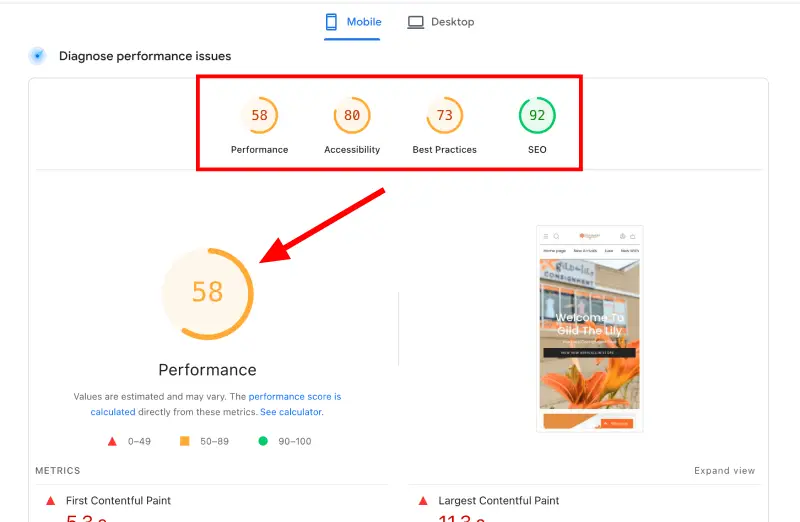
Mobile Score: 58
Desktop Score: 86
A mobile score below 60 means one thing: shoppers on phones are waiting too long. In eCommerce, slow equals lost sales.
My goal was to identify exactly what was slowing the store down and map out how to reach 80+ on mobile and 90+ on desktop without hurting the design, functionality, or SEO.
This case study walks through what I found, why it matters, and how I would fix it step-by-step.
Why the Site Felt Slow
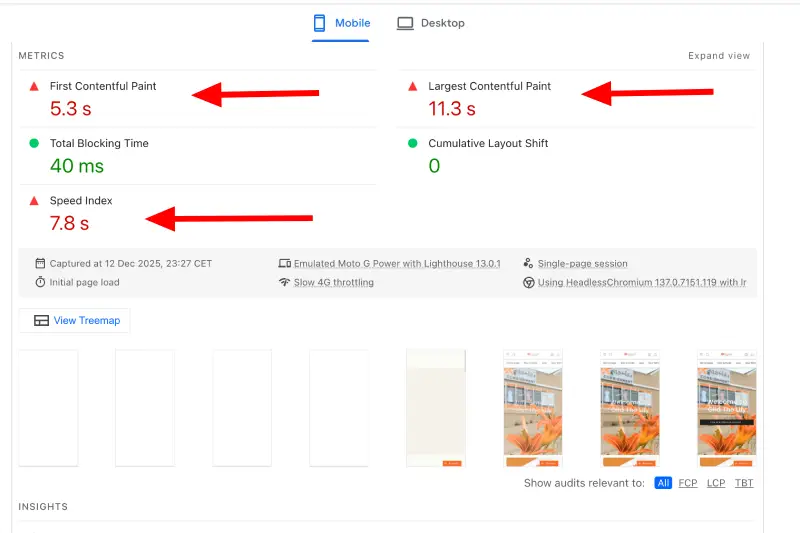
The site wasn’t slow because of one giant problem—it was slow because of several small issues stacking on top of each other. Think of it like a backpack overloaded with unnecessary stuff.
Here’s the breakdown of the biggest pain points.
First Contentful Paint (FCP): 5.3 seconds
This measures how long it takes for anything to show up on the screen.
At 5.3 seconds, visitors stare at a blank page for too long. Most users will already start losing trust.
What caused it:
- Heavy scripts loading before the page
- Large hero image not optimized
- No preloading of above-the-fold content
What I would do:
- Stop the scripts that block the page from loading
- Compress and preload the hero image
- Only lazy-load content below the fold
This alone creates a noticeably smoother first impression.
Largest Contentful Paint (LCP): 11.3 seconds
This is the biggest red flag.
LCP is the moment the main content appears—usually the hero image or banner.
On this site, that moment took 11.3 seconds.
A perfect recipe for a bounce.
Why it was so slow:
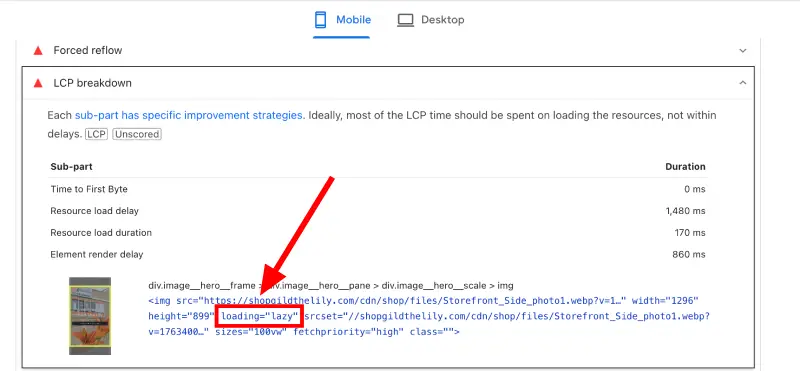
- The hero image was lazy-loaded (never do this)
- The image file was much bigger than necessary
- It was a PNG instead of a WebP
- Shopify wasn’t preloading the main banner image
That combination almost guarantees a bloated and sluggish load.
My fix:
- Remove lazy loading from the hero image
- Convert the hero image into WebP
- Reduce the image size to what’s actually displayed
- Preload the main image so browsers fetch it instantly
Once fixed, LCP can drop from 11 seconds to under 3, which is a massive win for SEO and user experience.
Speed Index: 7.8 seconds
Speed Index shows how quickly the entire visible page becomes usable.
A result near 8 seconds means everything loads slowly across the board—not just the hero section.
Why:
- Too much JavaScript firing early
- Too many CSS rules loading at once
- App scripts loading everywhere (even where not needed)
My fix:
- Minify CSS & JavaScript
- Cut unnecessary script execution
- Defer scripts that don’t need to load at the top
- Remove leftover code from old apps/themes
Every second trimmed here directly improves conversions.
Image Problems (The Biggest Contributor to Slowness)
Images were a major issue across the entire site.
1. Oversized images everywhere
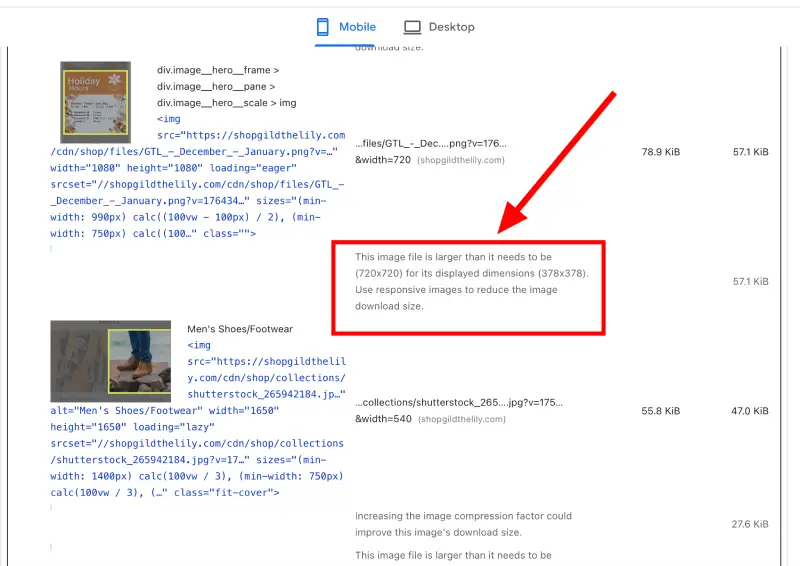
Example:
A product image displayed at 378×378 was being loaded at 720×720.
That means the browser was forced to download double the necessary size.
Fix:
- Resize images to the exact size they appear on the page
- Convert them to WebP
- Compress without losing quality
This reduces weight dramatically.
2. Unnecessary PNG files
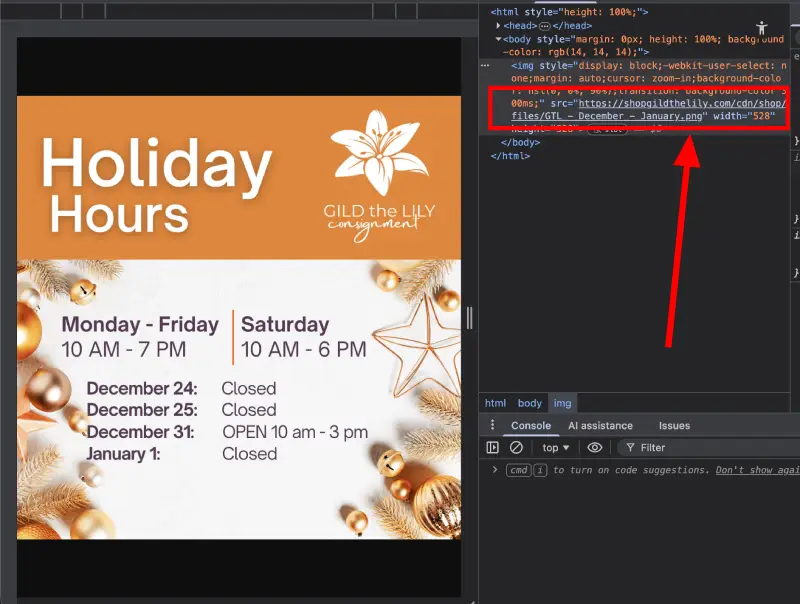
PNG is great when transparency is needed.
But for normal photos? It hurts performance.
Fix:
- Convert all non-transparent PNGs to WebP
- Strip unnecessary metadata
- Re-upload optimized versions
This often cuts file sizes by 60%–80%.
3. Missing alt text + random file names
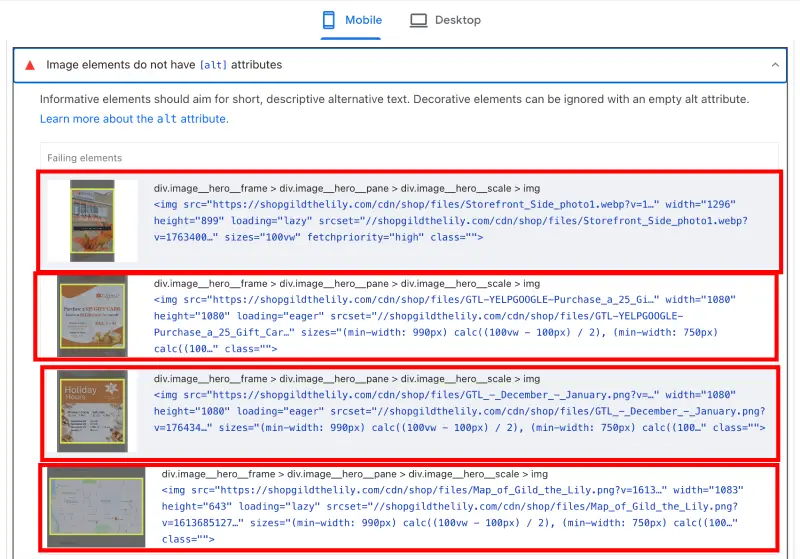
Examples found:
- IMG_565954958449.png
- Images with no alt attributes
This hurts SEO and accessibility.
Fix:
- Add descriptive alt text (“Black leather crossbody bag”)
- Rename files to meaningful names (“black-crossbody-bag.webp”)
- Ensure Shopify serves SEO-friendly filenames
Small detail, big SEO impact.
The LCP Issue Caused by Lazy Loading the Hero Image
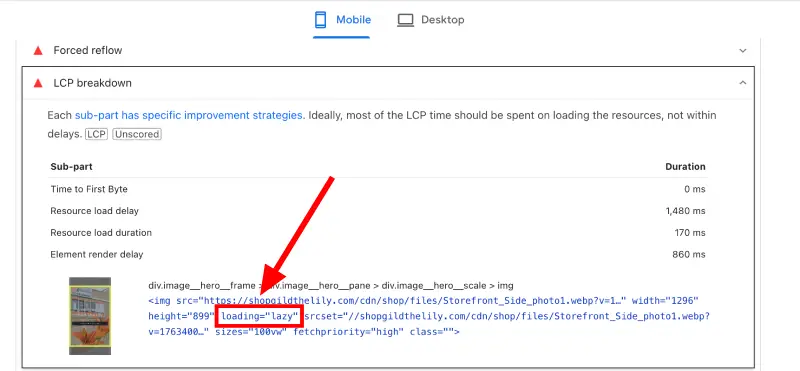
The hero image—the very first visual on the homepage—was set to loading=”lazy”.
Lazy loading delays the image until the visitor scrolls…
But because the hero image is the first thing they should see, lazy-loading it means it appears very late.
Fix:
- Remove loading=”lazy” from the hero banner
- Preload it
- Convert it to WebP
- Compress and resize it
This is one of the fastest ways to improve both speed and SEO.
Theme & Coding Opportunities
The theme wasn’t broken, but it was carrying unnecessary baggage.
1.Minifying Code
Large CSS and JS files slow down the first load.
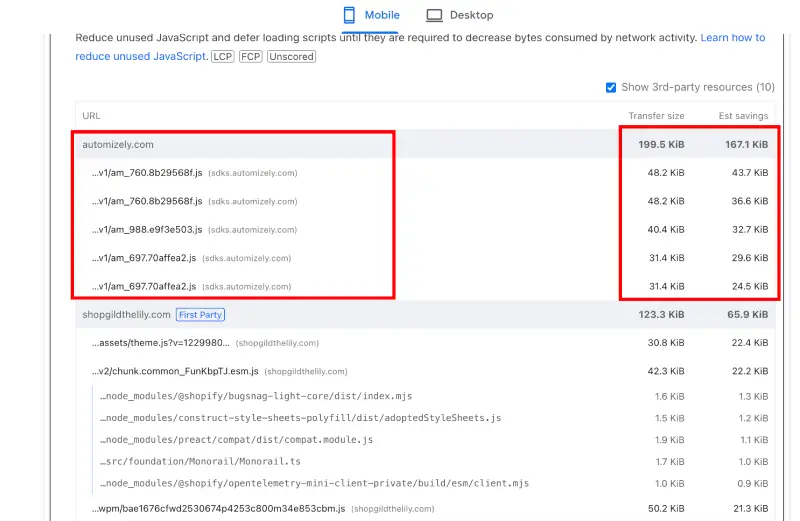
Fix:
- Minify CSS
- Minify JavaScript
- Remove unused CSS blocks
- Inline only the essential CSS needed for the first screen
This gives the browser significantly less work to do.
2. Heavy & Redundant Apps Slowing the Website Down
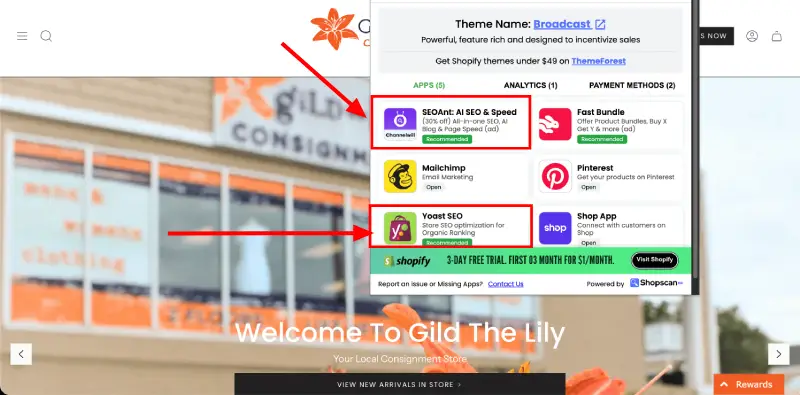
Apps detected:
- SEO & AI SEO + Speed
- Yoast SEO
- Mailchimp
- Pinterest
- FastBundle
Immediate problems:
- Two SEO apps is unnecessary and damaging
- SEO apps inject scripts that slow down pages
- Pinterest and Mailchimp add trackers on every page
- Bundle apps increase JS load, especially on product pages
Each one individually isn’t terrible—but combined, they stack up.
Fix:
- Remove one of the SEO apps completely
- Disable app scripts on pages where they aren’t required
- Replace app-based features with lightweight custom code where possible
- Clean up leftover code from previously deleted apps
This alone can add 10–20 points to the PageSpeed score.
Final Step-by-Step Optimization Plan
Here’s exactly how I would bring the site to an 80+ mobile score:
- Rebuild and compress all images → convert to WebP
- Fix the hero image (no lazy loading + preload + WebP)
- Minify all CSS and JavaScript
- Defer scripts that aren’t needed right away
- Remove unnecessary apps and leftover app code
- Load only essential assets above the fold
- Preload fonts, LCP image, and key theme files
- Re-test and fine-tune until mobile hits 80+ and desktop hits 90+
Expected Results
With the optimization plan applied, Gild the Lily should see:
- LCP dropping from 11.3s → under 3s
- Mobile score rising from 58 → 80+
- Desktop score reaching 90+
- Faster loading across all pages
- Better SEO rankings (Google rewards fast websites)
- Higher conversion rates from smoother browsing
Fast websites win. Slow websites leak money.
This is exactly what an optimized Shopify store should feel like.