


Decor by Amanda is a home décor focused Shopify store with an existing organic presence and steady traffic.
The brand already attracts visitors through search, which means the foundation is there.
However, during a performance audit, it became clear that the website’s speed and technical setup are holding it back from reaching its full potential.
Table of Contents
This case study focuses specifically on website speed, performance, and Core Web Vitals, highlighting the issues I found and how I would fix them to improve user experience, SEO performance, and overall site stability.
Initial Performance Snapshot

From PageSpeed / Core Web Vitals tools:
- Performance Score: 49
- Monthly Visitors: ~195
- Organic Keywords: ~567
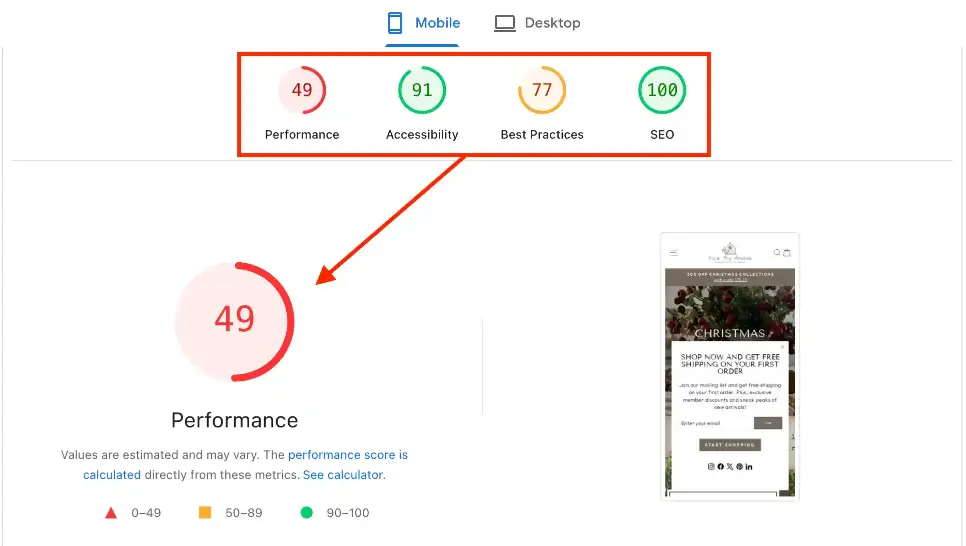
A performance score under 50 is a red flag, especially for an eCommerce site.
While the site already receives organic traffic, slow load times and poor Core Web Vitals can limit growth, reduce conversions, and weaken SEO over time.
My performance target for this site would be:
- Mobile: 70–80+
- Desktop: 90+
Key Performance Issues Identified
1. Core Web Vitals & LCP Problems
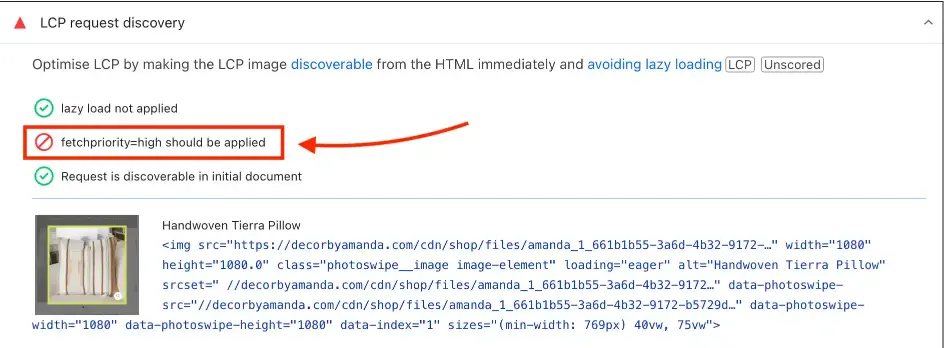
One of the most critical issues found was related to Largest Contentful Paint (LCP).
Problems identified:
- The main (hero) image does not have fetch priority applied
- The browser does not immediately understand which image is most important
- Lazy loading is applied to the hero image (which should never happen)
Why this matters:
The hero image is usually the largest element on the page. If the browser delays loading it, the page feels slow even if other elements load quickly.
How I would fix it:
- Remove lazy loading from the hero image
- Apply fetchpriority=”high” to the main image
- Preload the hero image so it loads immediately
- Ensure the hero image is properly optimized and resized
This alone can significantly reduce LCP time and improve perceived speed.
2. Heavy and Improperly Sized Images
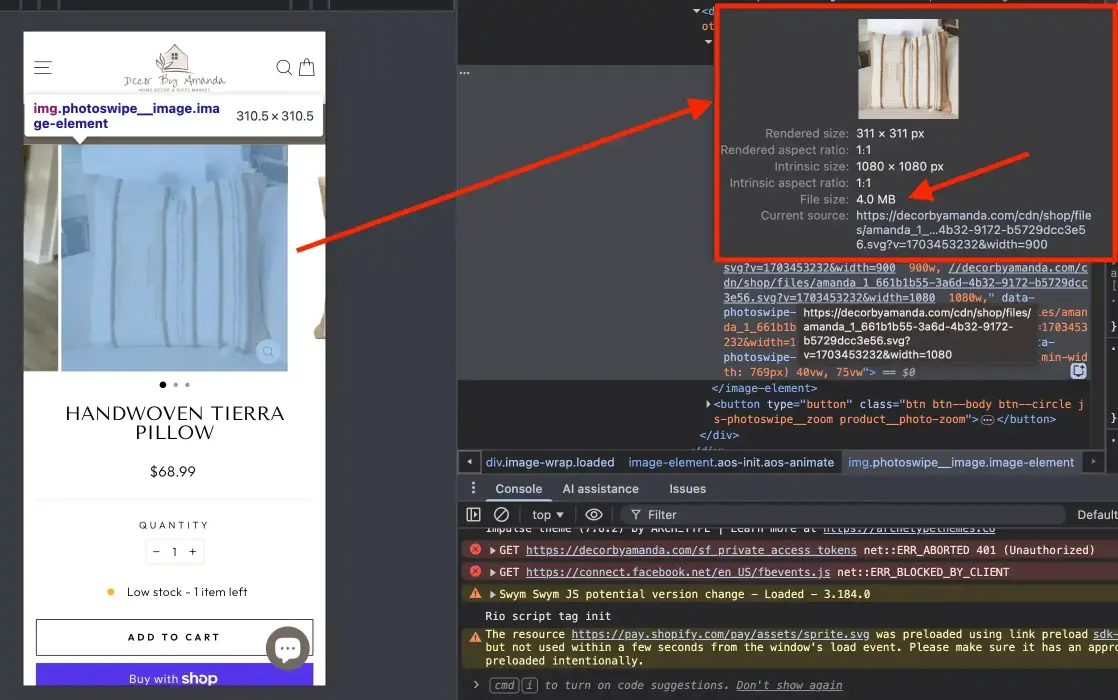
Multiple image-related issues were found across the site:
Issues:
- Images rendered larger than their displayed size
- JPG images used where WebP would be more efficient
- A product image weighing nearly 4 MB, which is extremely heavy for eCommerce
Why this hurts performance:
Large images increase load time, especially on mobile and slower networks. They also negatively affect SEO and Core Web Vitals.
How I would fix it:
- Resize images to match their actual display dimensions
- Convert all non-transparent images from JPG/PNG to WebP
- Compress images without losing visual quality
- Implement responsive images properly using Shopify’s image system
This would drastically reduce page weight and improve load speed.
3. JavaScript Overload from Apps and Theme Files
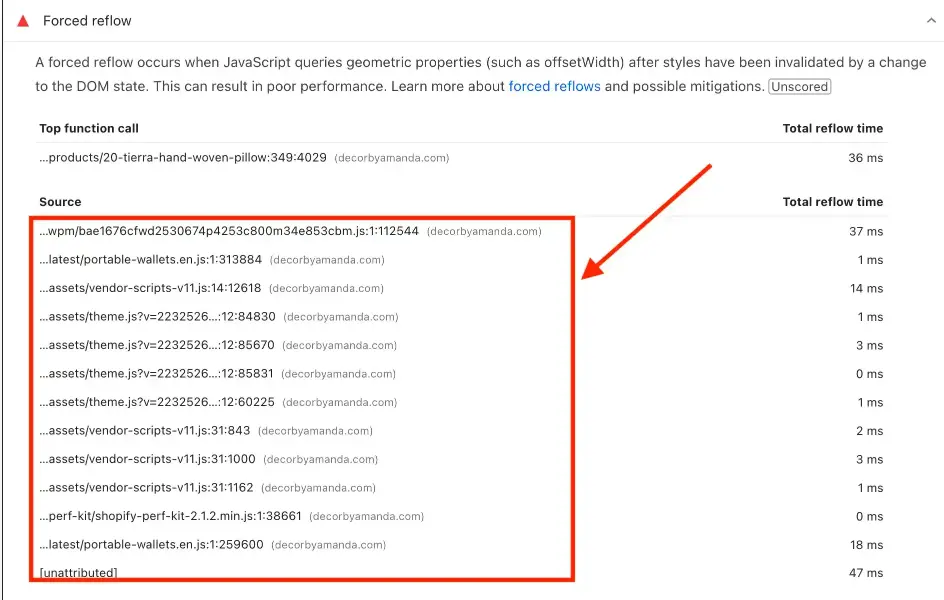
Another major issue was excessive JavaScript execution.
Problems found:
- Multiple Shopify apps injecting scripts globally
- Theme JavaScript files rendering even when not needed
- Duplicate or unnecessary scripts running on every page
Impact:
- Higher Total Blocking Time
- Slower interaction speed
- Poor mobile experience
How I would fix it:
- Audit all installed apps and remove unnecessary ones
- Load app scripts only on pages where they’re needed
- Defer non-critical JavaScript
- Remove unused or legacy theme JavaScript
Reducing JavaScript execution can dramatically improve responsiveness.
4. Unused and Excess CSS Code
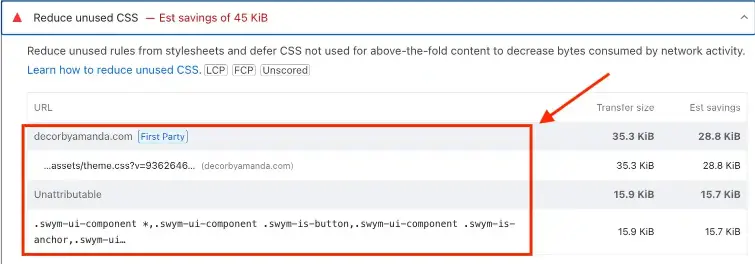
The audit showed CSS files rendering code that isn’t being used, which adds unnecessary weight to the site.
Why this matters:
Unused CSS increases file size and slows down rendering without providing any benefit.
How I would fix it:
- Remove unused CSS blocks
- Minify CSS files
- Inline only critical CSS needed for above-the-fold content
This helps the browser render pages faster and more efficiently.
5. LCP Request Discovery Issues
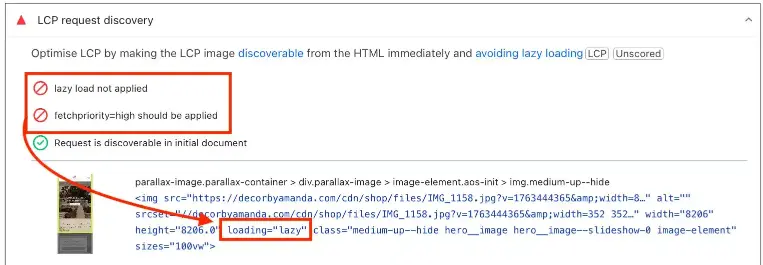
One screenshot showed that the browser struggles to quickly identify which assets are most important.
Issues:
- No prioritization for key visual elements
- Browser loads resources inefficiently
Fix:
- Proper preload and fetch priority setup
- Clear hierarchy for above-the-fold assets
This improves both speed and stability.
Schema & Structured Data Review (Quick Note)
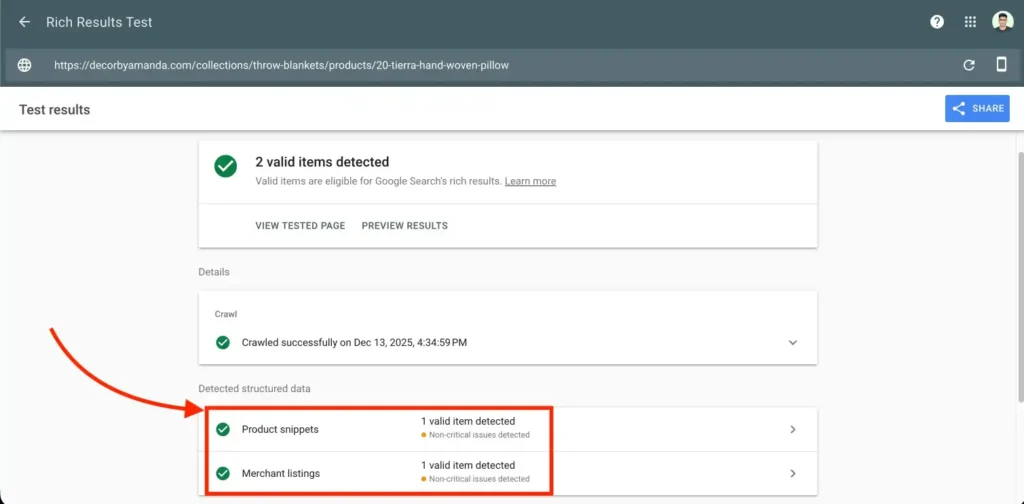
While this audit focused on speed, I also checked basic schema implementation:
What’s already implemented (good):
- Product schema
- Merchant listing schema
What’s missing:
- Breadcrumb schema
- Organization schema
- FAQ schema (where applicable)
This doesn’t affect speed directly, but it’s an opportunity for stronger SEO and richer search results, which can be addressed in a separate technical SEO phase.
Technical SEO Issues Identified (Audit Findings)
After completing the speed and performance audit, I also reviewed the site from a technical SEO perspective.
The goal here wasn’t to redesign anything or overcomplicate the setup, but to identify clear, fixable issues that directly affect crawlability, rankings, and long-term organic growth.
Below are the key technical SEO problems I found during the audit.
1. Images Over 300 KB
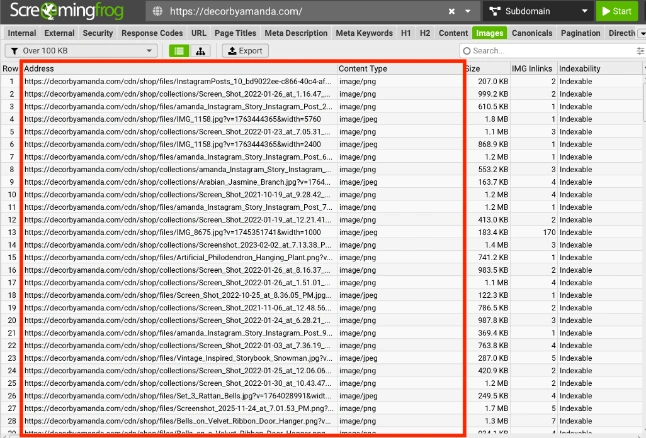
Several images across the site are larger than 300 KB, which creates two problems at once:
- It slows down page load time
- It negatively impacts SEO and Core Web Vitals
Large images make pages heavier than necessary and reduce performance, especially on mobile devices.
Why this matters:
Google considers page speed a ranking factor, and oversized images are one of the most common causes of slow Shopify stores.
Fix:
- Compress all images over 300 KB
- Convert images to WebP format
- Resize images to match their actual display size
2. Missing H1 Tags on Multiple Pages
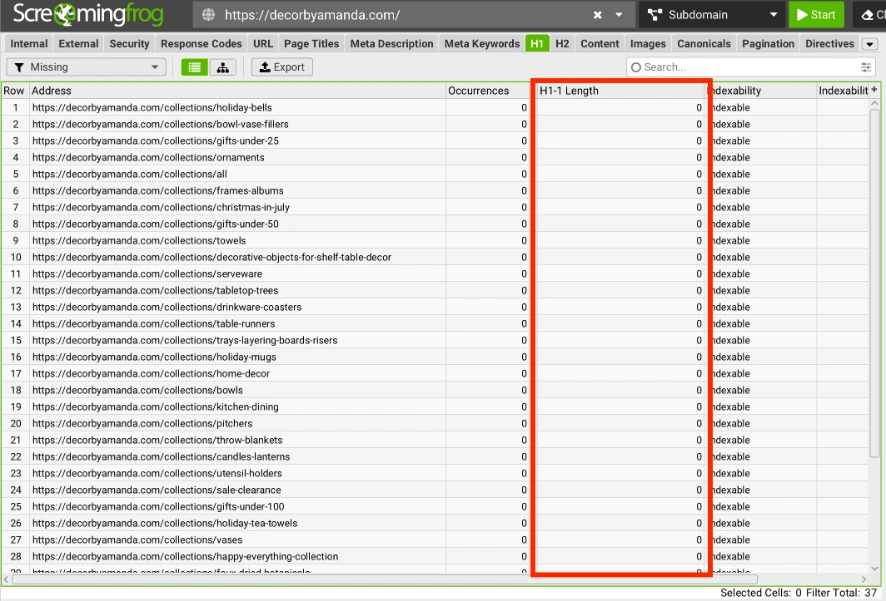
A significant number of pages do not have an H1 tag, which is a serious technical SEO issue for a Shopify store.
Why this matters:
The H1 tag tells search engines what the page is primarily about. Without it, Google has to guess the page topic, which weakens relevance and rankings.
Fix:
- Ensure every indexable page has one clear H1 tag
- Align the H1 with the page’s main keyword or intent
3. Meta Titles Below 30 Characters
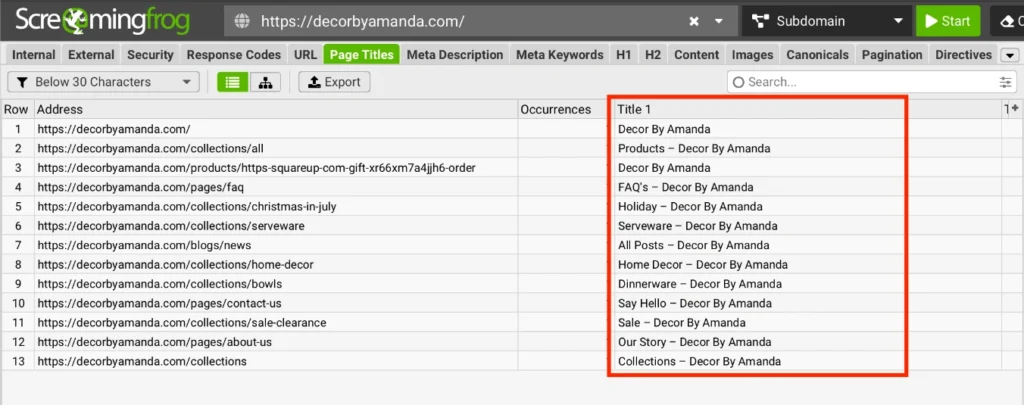
Many pages have meta titles that are shorter than 30 characters.
Why this matters:
While titles should stay under ~60 characters, titles that are too short don’t provide enough context for search engines or users. This reduces click-through rate and keyword relevance.
Fix:
- Rewrite titles to be 30–60 characters
- Include primary keywords and clear context
- Avoid generic or vague titles
4. Missing Meta Descriptions
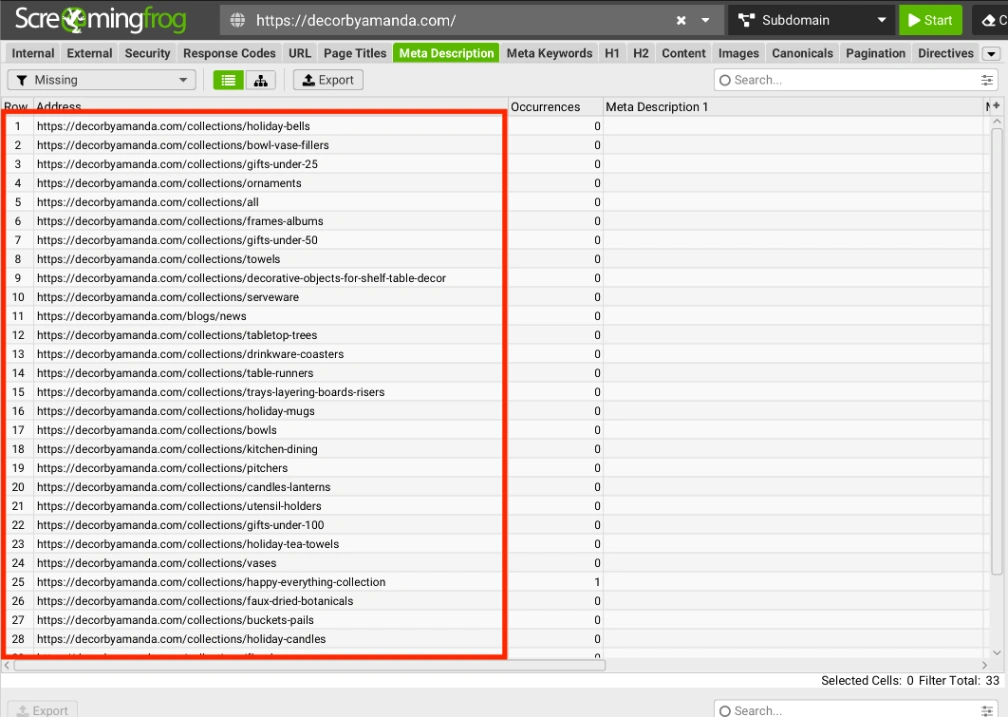
A large number of pages—especially collection pages—have no meta description at all.
Why this matters:
Meta descriptions don’t directly affect rankings, but they strongly influence click-through rate.
Pages without descriptions often get auto-generated text, which looks messy in search results.
Fix:
- Add unique, descriptive meta descriptions
- Keep them within 150–160 characters
- Clearly explain what the page offers
5. Images Without Alt Text
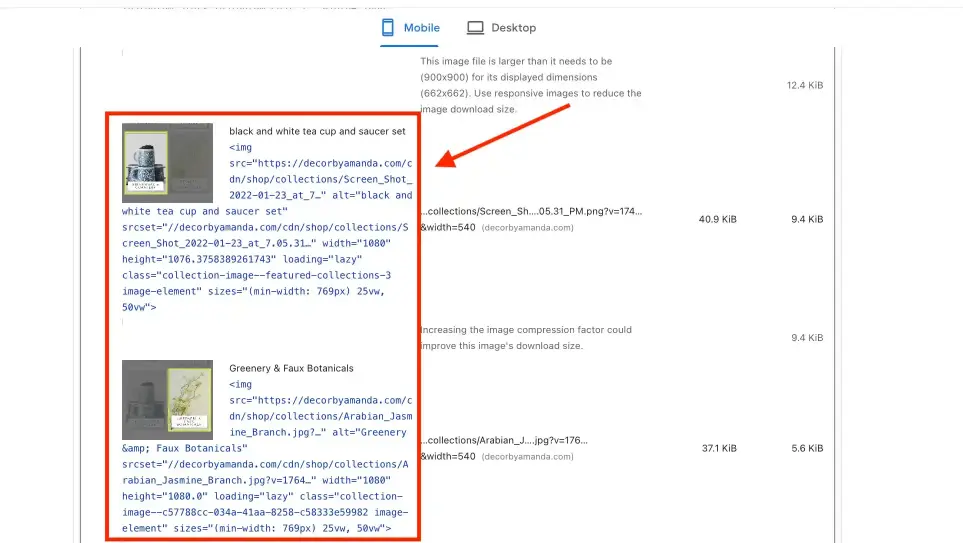
Many images on the site are missing alt tags, which is a major SEO and accessibility issue.
Why this matters:
- Search engines understand image content
- Improve image search visibility
- Improve accessibility for screen readers
Missing alt text is a missed SEO opportunity and a technical mistake.
Fix:
- Add descriptive alt text to all important images
- Keep alt text natural and relevant (no keyword stuffing)
6. Canonical Issues on Collection Pagination
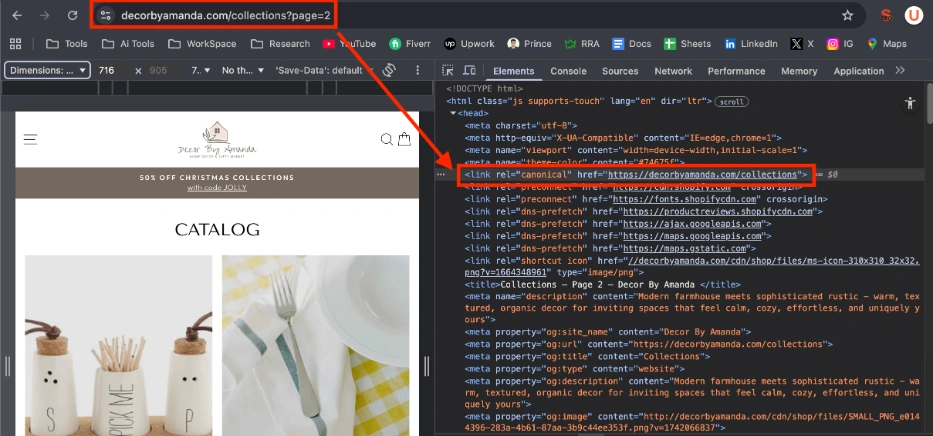
While canonical tags are implemented, an issue was found on collection pagination pages.
Problem:
Pagination pages (page 2, page 3, etc.) are canonically pointing back to page 1, which can confuse search engines and limit proper indexation.
Why this matters:
- Prevent deeper collection pages from being indexed
- Cause crawling inefficiencies
- Reduce visibility for paginated products
Fix:
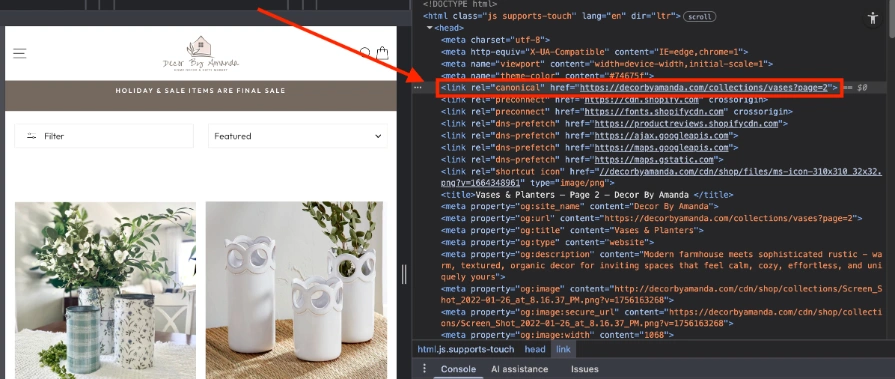
- Use self-referencing canonicals on paginated pages
- Ensure each page signals its own URL correctly
Here is a good example of proper canonical tag:
7. Product Schema Missing Aggregate Ratings
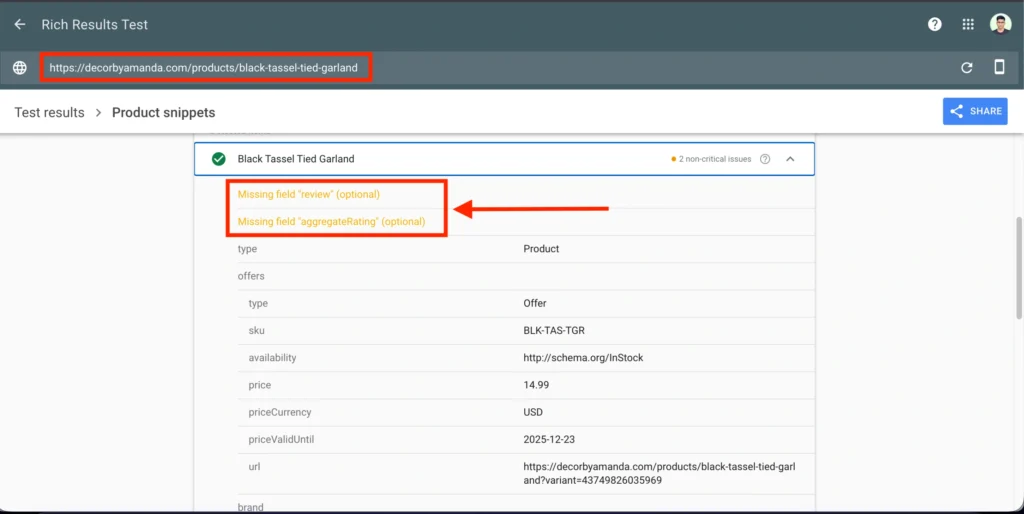
Product schema is implemented, which is good. However, aggregate rating data is missing from product structured data.
Aggregate ratings help:
- Enhance search appearance (rich results)
- Improve trust and click-through rate
- Strengthen product relevance in SERPs
Fix:
- Add aggregateRating schema where reviews exist
- Ensure ratings are dynamically populated and valid
Final Technical SEO Takeaway
The technical SEO issues found on Decor by Amanda are not complex, but they are impactful. These are the kinds of problems that slowly hold a site back without being obvious day to day.
Implementation Roadmap: How I’d Fix This Store
Phase 1: Fix What Breaks Speed First
- Compress all images over 300 KB
- Convert JPG/PNG images to WebP
- Resize images to match actual display dimensions
- Remove lazy loading from the hero (LCP) image
- Apply fetchpriority=”high” to the main LCP image
Why this phase first? Because speed impacts users, conversions, and rankings immediately.
Phase 2: Clean Up Theme & App Bloat
- Audit installed apps and remove unused scripts
- Load Judge.me and review scripts only where needed
- Remove unused CSS from theme files
- Defer non-critical JavaScript
This phase reduces unnecessary rendering and improves Core Web Vitals.
Phase 3: Fix Core On-Page SEO Structure
- Add one clear H1 tag to every indexable page
- Rewrite meta titles to be 30–60 characters
- Add missing meta descriptions to collection pages
- Add descriptive alt text to all key images
This phase helps Google understand what each page is about.
Phase 4: Resolve Technical SEO Signals
- Fix canonical tags on paginated collection pages
- Ensure pagination pages use self-referencing canonicals
- Add missing aggregateRating to product schema
- Validate structured data with Rich Results testing
This phase improves crawlability, indexing, and SERP appearance.
Phase 5: Final Validation
- Re-test with PageSpeed Insights
- Re-check Core Web Vitals
- Validate schema and metadata
- Monitor performance improvements
This approach fixes speed, usability, and SEO in the right order without breaking the store or overengineering the setup.
Conclusion
This audit showed that the main issues holding Decor by Amanda back are not complex or uncommon—they’re structural.
Oversized images, improper loading of the hero section, unnecessary JavaScript, and missing SEO fundamentals are quietly hurting performance, crawlability, and user experience.
The important part is this: nothing here requires a rebuild.
With a focused, step-by-step approach starting with speed and Core Web Vitals, then cleaning up on-page SEO, and finally fixing technical signals like canonicals and schema the site can move from a performance score of 49 to a stable 70–80+ range while also becoming far more search-friendly.
This is exactly the kind of optimization that compounds over time. Technical improvements that turn existing traffic into better rankings, better engagement, and better conversions.