


Heart of Haute is a women-focused fashion brand known for vintage-inspired pin-up, rockabilly, and retro clothing. The brand has been around since the mid-2000s and clearly has a strong identity and loyal audience.
However, when I audited the website from a performance perspective, the technical side of the store was not supporting that brand experience—especially on mobile.
This case study focuses purely on website speed and performance, explaining what’s slowing the site down and how I would fix it to create a smoother shopping experience and stronger SEO foundation.
Table of Contents
Initial Performance Snapshot
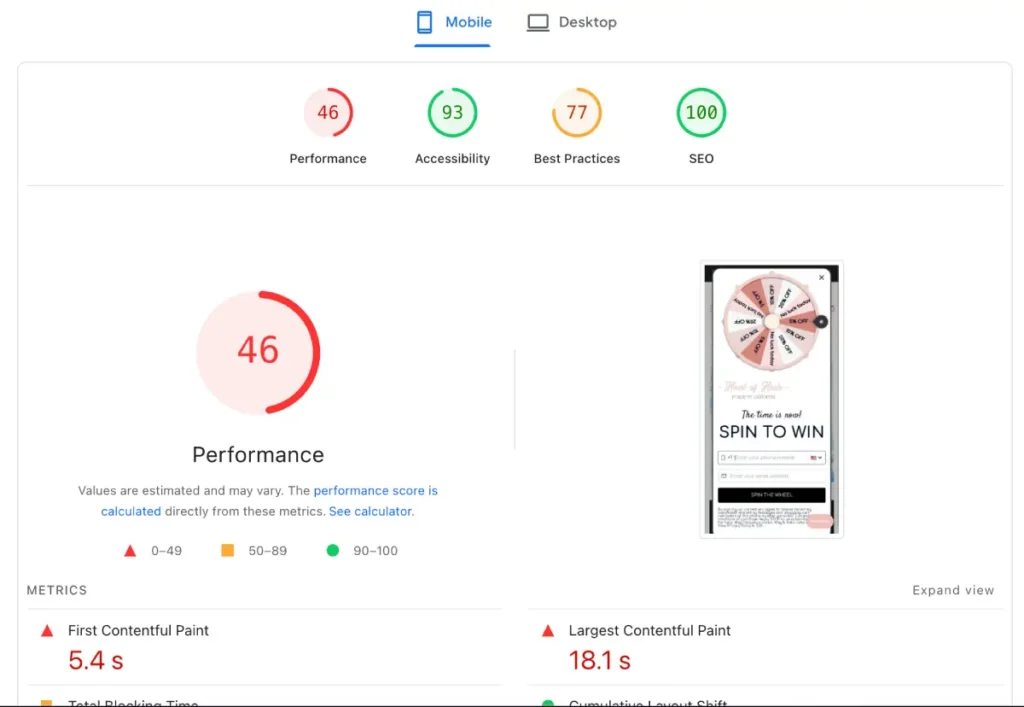
From Google PageSpeed Insights (Mobile):
- Performance Score: 46
- Accessibility / Best Practices / SEO: Average, but improvable
A score of 46 is a serious warning sign. At this level, users experience visible delays, slow interactions, and frustration especially on slower mobile networks.
My optimization target for a store like this would be:
- Mobile: 70–80+
- Desktop: 90+
Core Speed Issues Identified
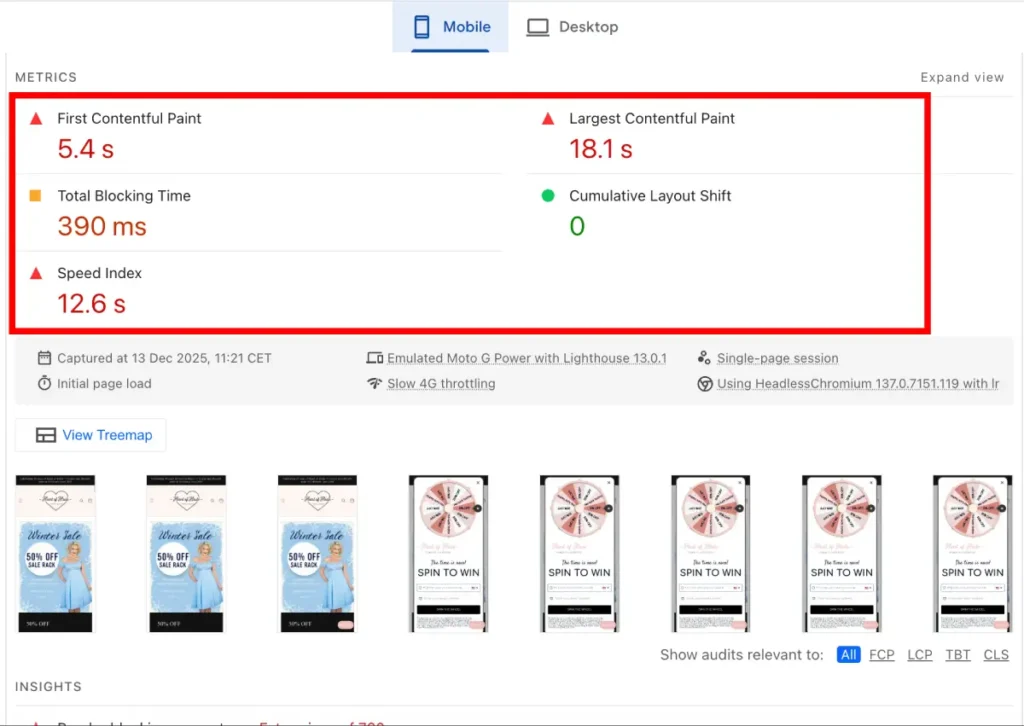
1. First Contentful Paint (FCP): 5.4 seconds
This means visitors wait over five seconds before seeing anything on the screen.
From a user’s point of view, that feels broken.
Why this is happening:
- Heavy images loading too early
- Fonts being fetched from external servers
- Scripts blocking the page before content appears
How I would fix it:
- Optimize and preload above-the-fold images
- Reduce render-blocking scripts
- Optimize font loading so text appears faster
2. Largest Contentful Paint (LCP): 18.1 seconds
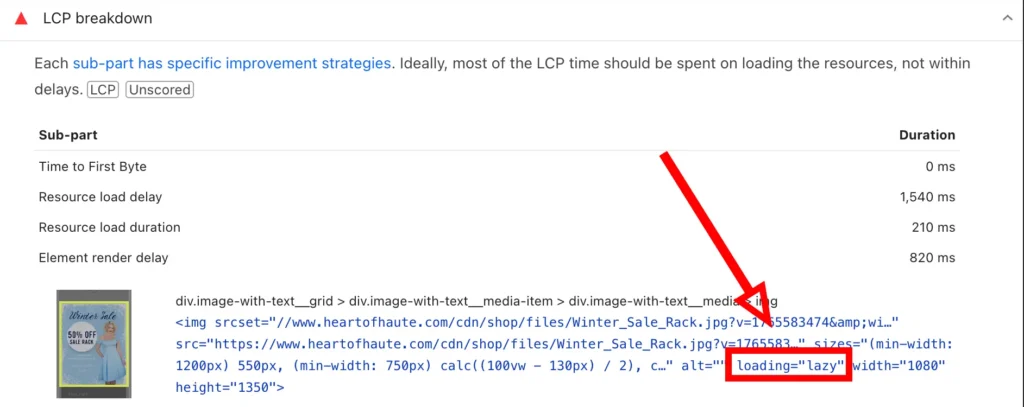
This is the most serious issue on the site.
LCP measures how long it takes for the main content (usually the hero image or banner) to fully load.
At 18.1 seconds, most users will abandon the page long before the site finishes loading.
Root causes I found:
- The hero image is lazy-loaded (a common but critical mistake)
- Large image files not properly optimized
- No preload priority for the main visual element
How I would fix it:
- Remove lazy loading from the first image entirely
- Preload the hero image so the browser fetches it immediately
- Compress and convert the hero image to WebP
- Ensure correct image sizing for different screen widths
This single fix can cut LCP by more than half when done correctly.
3. Speed Index: 12.6 seconds
Speed Index shows how quickly the page becomes visually complete.
At over 12 seconds, the page feels slow even after content starts appearing.
What’s causing it:
- Too much JavaScript executing early
- Heavy third-party apps loading on every page
- Unoptimized images across templates
How I would fix it:
- Defer non-essential JavaScript
- Load third-party scripts only where needed
- Reduce the overall page weight
4. Total Blocking Time (TBT): 390 ms
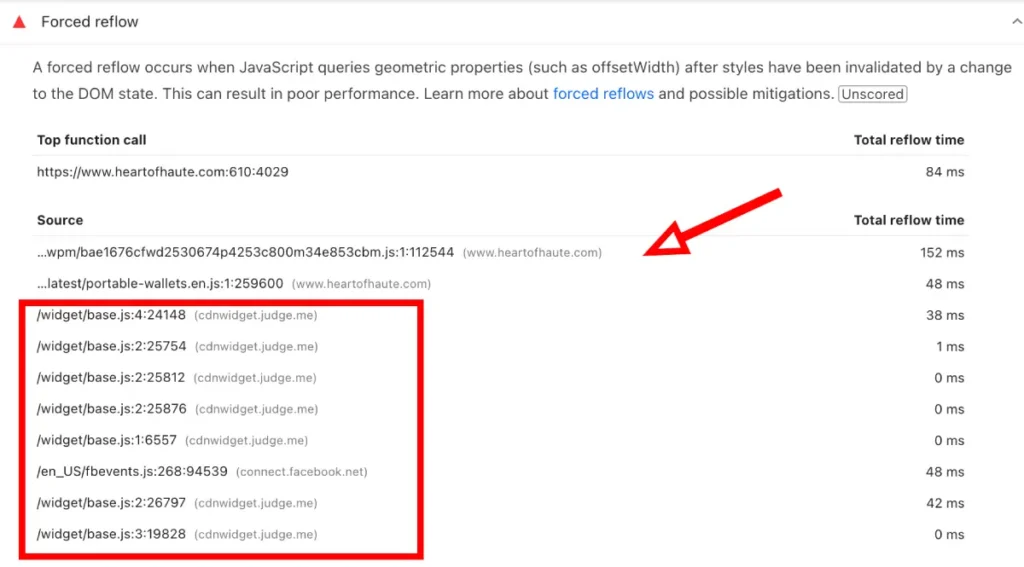
This indicates JavaScript is actively blocking the browser from responding to user input.
One major contributor here is the Judge.me review app.
The problem:
- Judge.me scripts load globally
- Reviews don’t need to render on every page
How I would fix it:
- Load Judge.me scripts only on product pages
- Defer review-related JavaScript
- Prevent unnecessary execution on collections, homepage, and informational pages
This improves both speed and interaction responsiveness.
Image Optimization Issues
1. Incorrect Image Dimensions
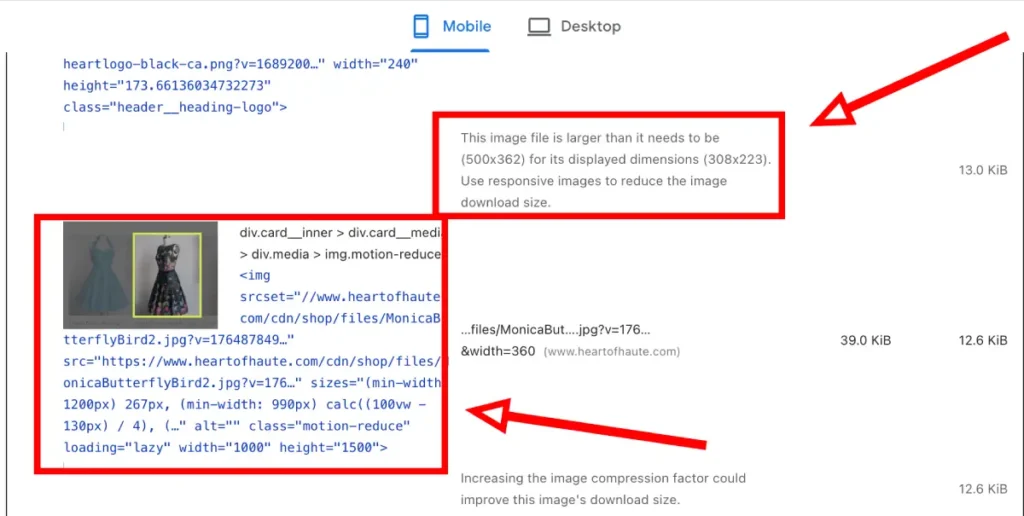
Example found:
- Image displayed at 308 × 223
- Image loaded at 500 × 362
This forces the browser to download more data than needed.
Fix:
- Serve responsive images
- Match image dimensions to actual display size
- Use Shopify’s image resizing correctly
2. JPG Images That Should Be WebP
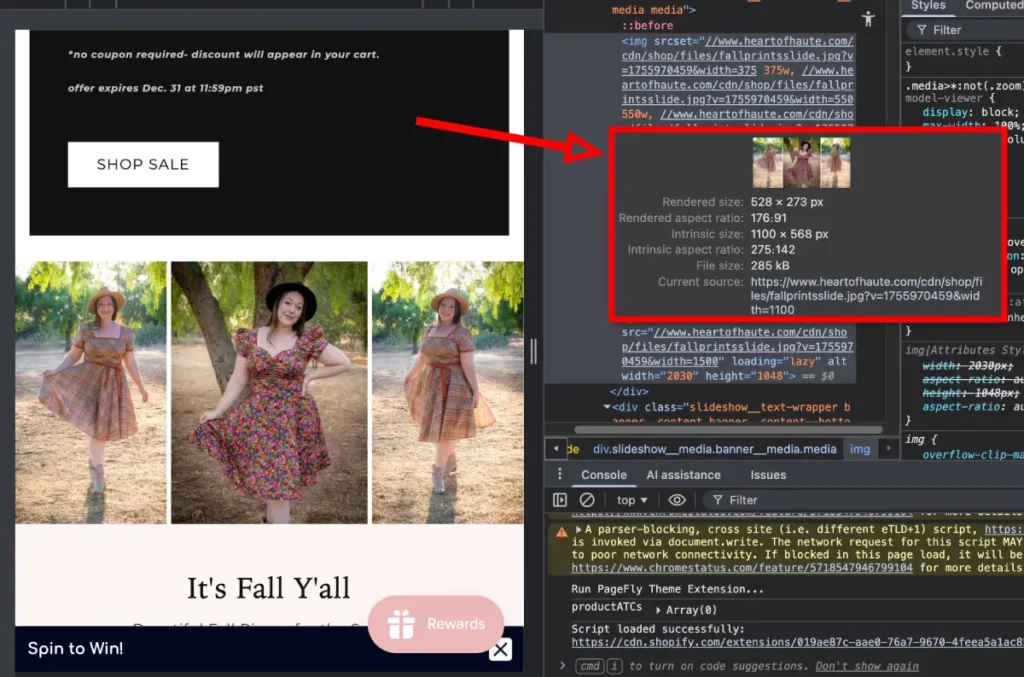
Some images were technically acceptable in size but still heavier than necessary.
Better approach:
- Convert JPG images to WebP
- Compress images without visible quality loss
This alone can reduce image weight by 30–60%.
Font Loading Problems
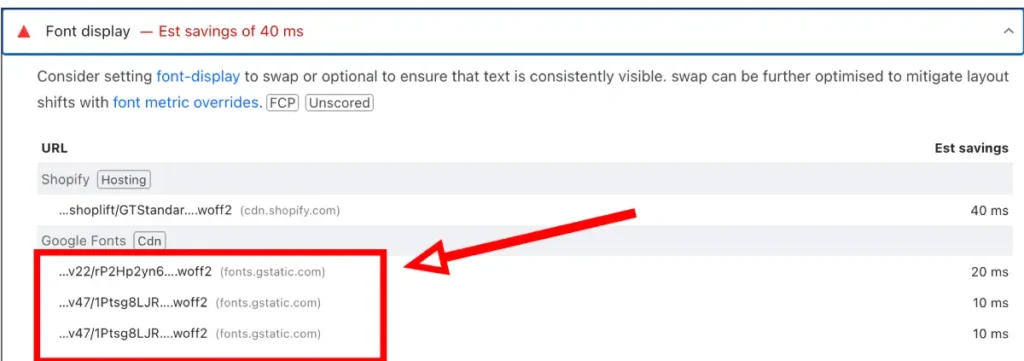
The site uses Google Fonts loaded directly from Google’s CDN.
Why this matters:
- External font requests slow down first paint
- Fonts loading late can cause layout shifts (CLS issues)
- Text can appear invisible while fonts load
How I would fix it:
- Self-host Google Fonts
- Preload critical font files
- Use proper font-display settings to prevent layout jumps
This improves both speed and visual stability.
Lazy Loading Mistake on the Hero Image
Just like many Shopify stores, the first visible image was set to lazy load.
This is one of the most common performance mistakes.
Why it’s bad:
- Lazy loading delays the most important image
- It directly hurts Core Web Vitals
Fix:
- Remove lazy loading from the hero image
- Set high loading priority
- Preload the image
Lazy loading should be used below the fold, not above it.
CSS & JavaScript Optimization
The site would benefit significantly from better asset management.
Issues identified:
- CSS not minified
- JavaScript executing before it’s needed
- App scripts loaded globally
How I would fix it:
- Minify CSS and JavaScript
- Defer non-critical scripts
- Remove unused CSS blocks
- Load app scripts conditionally instead of site-wide
Final Optimization Strategy
If I were optimizing Heart of Haute, my workflow would be:
- Fix the LCP hero image (priority fix)
- Compress and convert all images to WebP
- Correct image sizing across the site
- Remove lazy loading from above-the-fold content
- Optimize Judge.me script loading
- Self-host and preload fonts
- Minify and defer CSS and JavaScript
- Clean up unused app code and scripts
- Re-test and iterate until performance stabilizes
Expected Results
With these improvements implemented:
- Performance score improves from 46 → 70–80+
- LCP drops from 18.1s → under 3 seconds
- Faster page rendering on mobile
- Better Core Web Vitals
- Improved SEO signals
- Smoother, more enjoyable shopping experience
Final Thoughts
Heart of Haute has a strong brand and a clear audience. The performance issues aren’t about effort or design. They’re about technical debt that naturally builds up over time in Shopify stores.
With focused speed optimization, this store could feel as polished and smooth as the brand itself.